
When I decided to rebuild my portfolio website, I had one clear goal: performance without sacrificing interactivity. I didn’t want a heavy JavaScript bundle loading on every page just to animate a few buttons or open a menu. At the same time, I didn’t want a completely static site that felt lifeless.
That’s when I discovered Astro with React Islands, and it completely changed how I think about frontend architecture.
In this post, I’ll walk you through why I chose Astro, how React Islands work, and how I structured and built my portfolio website step by step.
Why I Didn’t Use a Traditional SPA
My earlier portfolio versions were built with classic React or Next.js setups. They worked, but they had problems:
-
Too much JavaScript shipped to the browser
-
Slower initial load times
-
Overkill for mostly static content
-
SEO required extra attention
A portfolio website doesn’t need constant client-side reactivity. Most of the content is static: text, images, project descriptions. Only specific components actually need JavaScript—like theme toggles, animations, or interactive sections.
That’s where Astro shines.
What Makes Astro Different
Astro follows a content-first approach. By default, Astro ships zero JavaScript to the browser. Pages are rendered as static HTML, which makes them incredibly fast.
But here’s the magic:Astro allows you to add framework components (React, Vue, Svelte, etc.) only where needed.
This concept is called Islands Architecture.
Instead of hydrating the entire page, you hydrate small interactive islands. Everything else stays static.
For a portfolio website, this is basically perfect.
Understanding React Islands
In Astro, a React component becomes an island when you add a hydration directive like:
-
client:load
-
client:idle
-
client:visible
This means:
-
React runs only for that component
-
The rest of the page stays pure HTML
-
JavaScript is loaded only when required
So my navbar, animations, and interactive cards use React, but my blog pages and content sections stay static.
Best of both worlds.
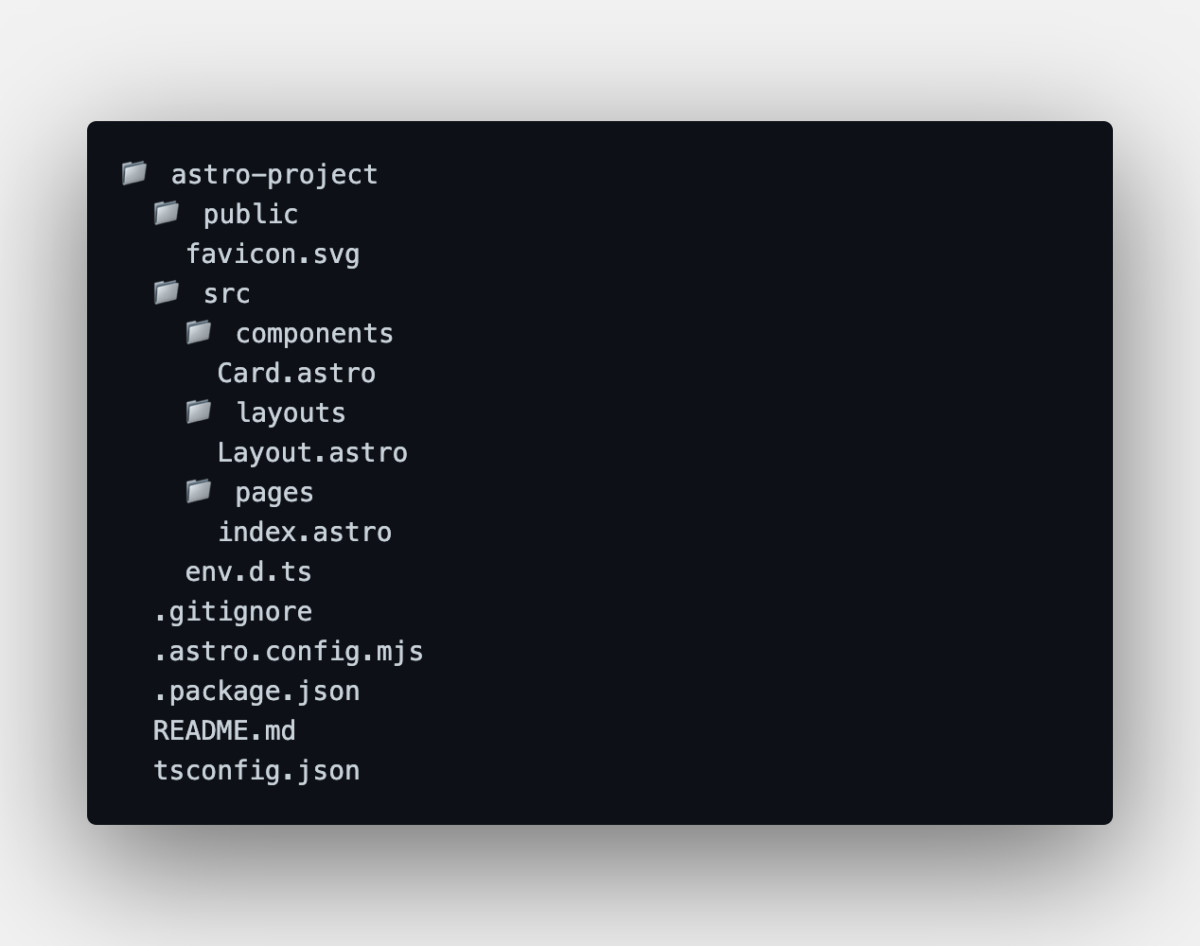
Image: A visual breakdown of Astro’s intuitive project structure, showcasing how file-based routing and the explicit separation of components, layouts, and pages contribute to a cleaner, more organized developer experience.
My Project Structure
I kept my structure clean and intentional:
-
Astro pages for layout and content
-
React components for interaction
-
Tailwind CSS for styling
-
Public assets for images and icons
Astro handled routing, layouts, and SEO beautifully. I didn’t need complex configs or plugins—everything felt simple and predictable.
Building the Hero and Layouts
The hero section of my portfolio is completely static. It’s just HTML and CSS rendered by Astro, which means:
-
Instant load
-
Perfect SEO
-
No hydration cost
I used Astro layouts to keep things DRY—header, footer, and metadata are shared across pages. This made the site easier to scale when I added more sections like projects and blogs.
The typography and spacing were carefully chosen to feel modern but readable. Since Astro outputs clean HTML, Lighthouse scores were already excellent without optimization hacks.
Where React Comes In
I used React only where it made sense:
-
Mobile navbar toggle
-
Animated skill bars
-
Hover-based project cards
-
Theme switcher
-
Small micro-interactions
Each of these is a React Island, hydrated only when needed.
For example:
-
Navbar loads on client:load
-
Animations use client:visible
-
Non-critical widgets load on client:idle
This kept JavaScript usage minimal while preserving a dynamic feel.
Image: A futuristic developer workspace in 2026, featuring a multi-monitor setup and AR glasses. The screens display a Dockerfile in a code editor, a terminal running build commands, and a real-time container monitoring dashboard, illustrating a high-tech, integrated development environment.
Styling with Tailwind CSS
I paired Astro with Tailwind CSS because it fits perfectly with component-based thinking.
Benefits I noticed:
-
No unused CSS
-
Faster iteration
-
Consistent design system
-
Easy responsive layouts
Since Astro doesn’t force CSS-in-JS, Tailwind works without friction. My styles are predictable, lightweight, and easy to maintain.
Performance and SEO Wins
After deploying the site, the results were immediately noticeable:
-
Extremely fast page loads
-
Near-perfect Lighthouse scores
-
Smaller JavaScript bundles
-
Better SEO without extra work
Because most pages are static HTML, search engines crawl them effortlessly. No hydration delays, no rendering flashes.
For a personal portfolio, this matters a lot—especially when recruiters open your site on slower networks.
What I Learned
Building my portfolio with Astro + React Islands taught me an important lesson:
Not every website needs to be a full SPA.
By being intentional about where I use JavaScript, I ended up with a site that’s:
-
Faster
-
Cleaner
-
Easier to maintain
-
More future-proof
Astro didn’t replace React for me—it refined how I use it.
Final Thoughts
If you’re building a portfolio, blog, or content-heavy website, I genuinely believe Astro is one of the best tools available right now. Pairing it with React Islands gives you performance by default and interactivity only where needed.
This setup helped me build a portfolio that truly represents my skills—not just visually, but architecturally.
If you care about speed, clarity, and modern frontend practices, Astro + React Islands is a combination worth exploring.